

Description
Invite All Facebook Friends in One Click
Overview
The Facebook Group Invite All 2016 extension is designed to streamline the process of adding multiple friends to a Facebook group with minimal effort. It enables users to select all or a subset of their Facebook friends and invite them simultaneously, eliminating the need for repetitive manual actions. This tool is particularly useful for community managers, marketers, and group administrators aiming to grow their online communities efficiently. The software operates as a browser extension, integrating directly into the Facebook interface, allowing users to initiate bulk invitations without leaving the platform. It was developed by FbLeadApp.com Team, a group focused on creating browser-based tools for Facebook users. The extension was updated in 2016 to align with changes in Facebook’s UI, ensuring continued functionality. While it does not claim to be officially affiliated with Facebook, it functions as a third-party utility to enhance user experience. Real-world applications include expanding group membership for events, promotions, or community-building initiatives. The tool supports users across Windows, Mac, and Linux platforms, making it accessible to a broad audience.
Key Features & Capabilities
- One-Click Bulk Invitations – Enables users to invite all or selected friends to a Facebook group with a single action, reducing time and effort.
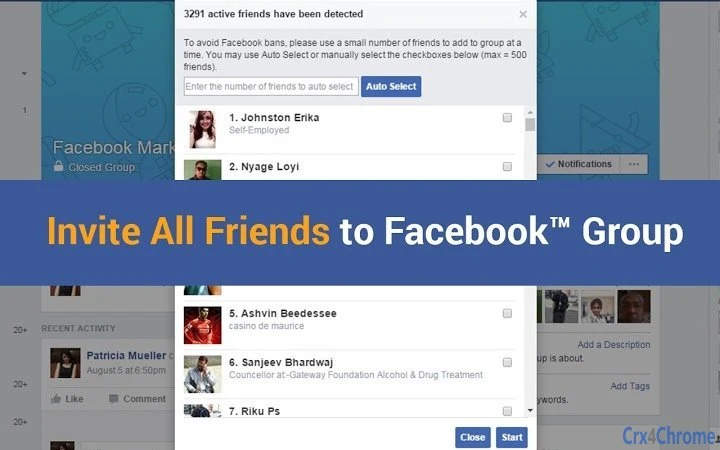
- Friend List Integration – Displays a comprehensive list of all Facebook friends directly within the group interface, allowing for quick selection.
- Flexible Selection Options – Users can choose to invite all friends or filter and select a specific subset based on criteria such as location, mutual friends, or custom preferences.
- Seamless UI Integration – Designed to work within the native Facebook Group interface, ensuring a smooth and intuitive experience without disrupting the standard workflow.
- Compatibility with Facebook UI Changes (2016) – Updated to function properly after Facebook’s interface updates in 2016, maintaining reliability over time.
These features are ideal for users managing active Facebook groups who need to scale membership quickly. For example, a business promoting a new product can use the tool to invite existing customers and followers to a dedicated support or discussion group. Similarly, community organizers can rapidly grow their networks by inviting relevant contacts in one session. The tool enhances efficiency by minimizing repetitive clicks and reducing the risk of human error during large-scale invitations.
User Interface, Workflow & Performance
The extension integrates directly into the Facebook Group interface, appearing as a button or menu option within the group’s admin tools. Navigation is straightforward, requiring minimal setup once installed. Users can access the friend list, select individuals, and initiate the invitation process with a few clicks. The workflow is designed to be intuitive, especially for non-technical users. However, exact performance metrics such as CPU or RAM usage were not specified by the developer. The extension’s behavior during operation is expected to remain stable under normal usage, though performance may vary depending on browser load and internet speed. The developer did not provide additional system requirements or resource usage details. Stability is assumed based on its long-standing presence and the fact that it was updated to address UI changes. Users are advised to restart their browser or refresh Facebook tabs after installation for optimal functionality. If the extension becomes disabled, it can be re-enabled via the browser’s extensions management page.
Compatibility & System Requirements
The software is compatible with Windows, Mac, and Linux operating systems. It is designed as a browser extension, meaning it operates within supported web browsers such as Chrome, Firefox, or Edge. The installation size is 1.2 MB, indicating a lightweight footprint. The version released on May 15, 2016, was updated to match Facebook’s UI changes at that time. However, the developer did not specify exact system requirements such as minimum RAM, processor speed, or browser versions. Compatibility information was partially provided, and users should ensure their browser supports extensions and has JavaScript enabled. The tool does not require dedicated hardware or advanced system configurations, making it accessible to most modern devices. It is important to note that ongoing Facebook updates may affect long-term functionality, though the 2016 version was designed to remain functional after that date.
Pros and Cons
Pros
- Efficiently invites multiple Facebook friends in a single action
- Integrates smoothly into the Facebook Group interface
- Supports selective invitations for targeted outreach
- Lightweight at only 1.2 MB in size
- Free to use with no subscription or hidden fees
Cons
- Released in 2016, may not support recent Facebook interface updates
- Exact system requirements were not specified
- Dependent on browser extensions, which may be blocked or disabled
- Not officially affiliated with Facebook, raising potential trust concerns
- Requires manual browser restart after installation for full functionality
FAQ Section
Is the Facebook Group Invite All 2016 extension compatible with all browsers?
The extension is designed to work with major browsers that support extensions, such as Chrome, Firefox, and Edge. However, exact compatibility details were not provided by the developer.
Is the software safe to use?
The tool is a browser extension developed by FbLeadApp.com. While it is not officially endorsed by Facebook, it does not require access to sensitive account data beyond standard Facebook permissions. Users should ensure they are downloading from trusted sources.
How often does the extension receive updates?
The extension was last updated in 2016. The developer has not indicated whether future updates are planned.
Can I use this tool if I’m not an admin of the Facebook group?
No. The extension requires the user to be either a member or an admin of the group to initiate invitations.
Does the extension work offline?
No. The extension requires an active internet connection and access to Facebook’s servers to function.
Final Thoughts
The Facebook Group Invite All 2016 extension offers a straightforward solution for users seeking to expand their Facebook group membership quickly. Its core functionality—inviting all or selected friends with one click—remains effective for basic use cases. While the tool is lightweight, free, and well-integrated into Facebook’s interface, its age raises concerns about long-term compatibility with current Facebook updates. Users should proceed with caution, especially if they rely on consistent performance. For those managing smaller groups and seeking a no-cost automation option, this extension may still deliver value. However, it is not recommended for users requiring advanced features or guaranteed compatibility with modern Facebook interfaces. Despite its limitations, it remains a viable option for specific, low-complexity tasks.
Download Facebook Group Invite All 2016 now
Guides & Tutorials for for Facebook Group) Invite All Friends 2016 Extension for Chrome
How to install for Facebook Group) Invite All Friends 2016 Extension for Chrome
- Click the Preview / Download button above.
- Once redirected, accept the terms and click Install.
- Wait for the for Facebook Group) Invite All Friends 2016 Extension for Chrome download to finish on your device.
How to use for Facebook Group) Invite All Friends 2016 Extension for Chrome
This software is primarily used for its core features described above. Open the app after installation to explore its capabilities.
User Reviews for for Facebook Group) Invite All Friends 2016 Extension for Chrome 0
No reviews found





